


TabMate for product marketers and GTM teams.
Save proof from competitor pages, reviews, buyer threads, and docs in one workspace, then turn the research into evidence-backed briefs, messaging drafts, and follow-up work without rebuilding the context.
Best fit for recurring competitor research, review mining, and positioning work in B2B SaaS.
You are eight tabs deep. Now try writing the brief.
You have the competitor page, a review thread, and saved notes from the last pass. The insight is in there somewhere. But when it is time to turn that into a brief, the proof, the context, and the next step are no longer held together in one workflow.
The proof gets scattered
You found the useful pricing detail, claim, or customer quote. But it now lives across tabs, partial notes, and old threads instead of one workspace tied to the project.
The context resets next session
When the teardown comes back next week, you are re-reading the same pages and rebuilding the same picture instead of continuing from what you already captured.
The work falls out of the workflow
You can get a comparison from a chat tool. What is harder is keeping the page evidence, saved notes, and follow-up work together when the research keeps going.
The competitor research workflow that actually scales
TabMate replaces scattered knowledge with workspaces built specifically for evidence-backed product marketing.
Capture evidence while you browse
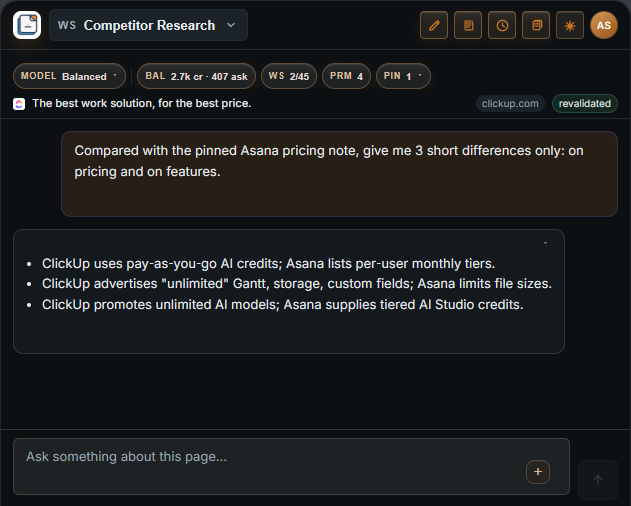
Open the sidebar on a useful page, review thread, or doc and ask from the source in front of you. Your questions stay tied to live evidence instead of vague recall.
Built for the GTM research that repeats every week
Three recurring jobs. One place to capture proof and turn it into output.
Competitor breakdowns and battlecards
Save pricing, claims, and feature gaps from competitor sites into one workspace, then turn them into a comparison brief your team can use.
Voice-of-customer and pain mining
Capture exact customer language from reviews, forums, and support threads, then turn it into a reusable bank of pains, objections, and desired outcomes.
Messaging and content briefs
Use the evidence you already captured to draft positioning notes, comparison angles, objection handling, or a content brief without starting cold.
The loop stays the same: browse, capture proof, build context, and produce output without starting over each session.
TabMate vs. how you do it today
The real alternative is scattered tabs, a notes doc, and a chat window that starts cold every time.
Tabs + docs + chat
TabMate
How your data is handled
TabMate uses the current page as evidence for your questions. That means being clear about what it reads, what it stores, and what you can delete.
What we read
TabMate is built around the page you are working in. It captures page context for the product workflows you use and does not passively scan background tabs or browsing history.
What we store
Your notes, excerpts, summaries, conversations, prompts, memories, and related workspace content are stored in your account so work can continue across sessions. Requests that generate responses are also sent through an LLM API provider.
What you control
You can delete individual notes, clear workspace content, or delete your account at any time from the account settings. Captured text lives in your workspace, not in a shared pool.
How it works
Open the panel
Open TabMate beside the page you are reading.
Grant access
Grant page access so TabMate can capture page context when you use it.
Ask from the page
Questions use the live page and any text you selected.
Save what matters
Notes, excerpts, and drafts stay in the workspace for next time.
Use agent mode
Trigger agent mode to click, fill, and interact across the page automatically. Guarded actions pause for your approval before the agent continues.
Page access is user-granted. TabMate does not intercept navigation, scan browsing history, or passively read background tabs you are not working in.